Cube Tap Sort
- 4.7
- Rating
- 500.00K
- Installs
- Free
- Price
 Analysis by App-foxy
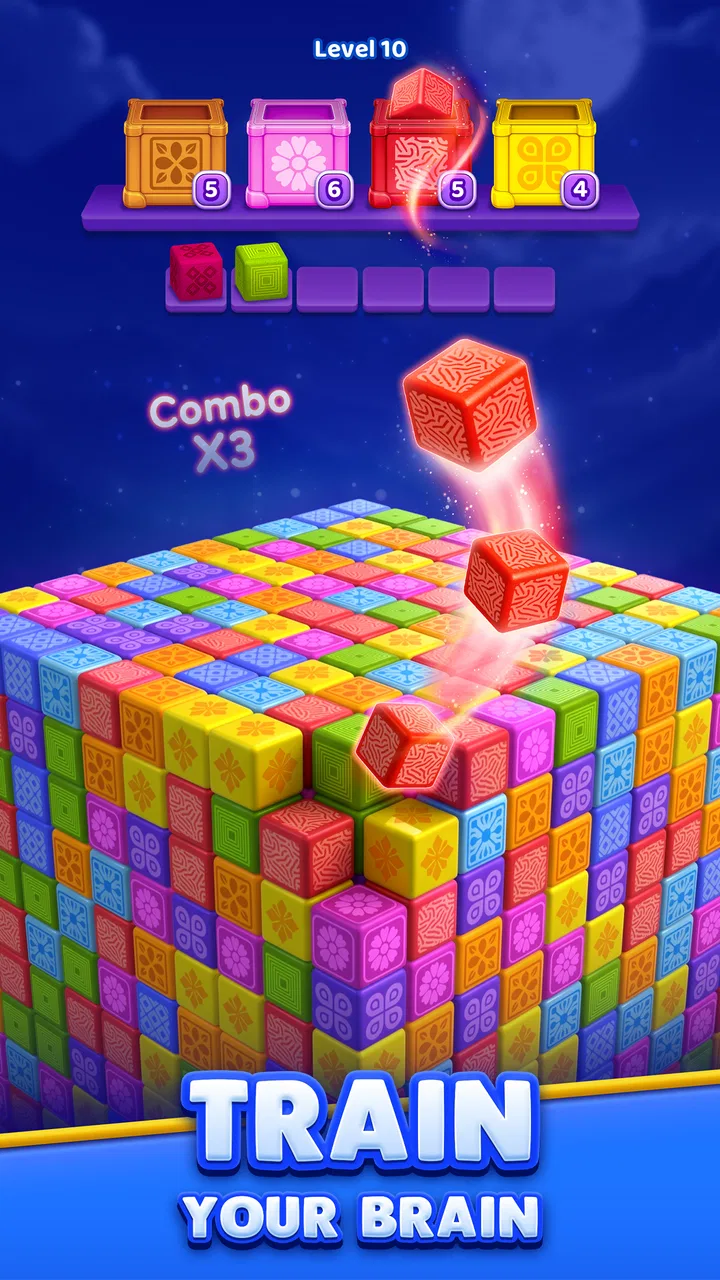
Cube Tap Sort is the kind of puzzle I open when I want something focused but not exhausting. The idea is easy to understand: tap colored blocks, organize matching colors, and work through a three-dimensional arrangement. What makes it interesting is that the board is not just a flat row of pieces. I have to read the visible structure, decide which move will expose useful blocks, and avoid turning a simple color match into a cramped position later.
That balance gives the game a pleasant middle ground between a traditional color-sort puzzle and a compact spatial brain teaser. It is free to start, rated for Everyone, and made by Tripledot Studios Limited. The current version is 1.5.6, and it runs on Android 7.1 or later. I would describe it as a casual puzzle for short sessions rather than a deep strategy game, although careful players can still find plenty to think about once the obvious taps stop working.
How the basic cube-sorting workflow feels
My normal session begins with a quick scan rather than immediate tapping. I look for colors that are already close to completion, then check whether moving one block will reveal another useful piece underneath or behind it. That small pause matters. The game invites fast fingers, but the better habit is to treat each tap as part of a sequence instead of reacting to the most colorful block on screen.
You May Also Like

 Blood Strike: 2.5 Anniversary
Blood Strike’s Loadouts Turn Every Drop Into a Tactical Gamble
A close look at Blood Strike’s custom loadouts: how fast access to signature weapons reshapes its battle royale rhythm, rewards preparation, and narrows the gap between fights.

 Pandora - Music & Podcasts
Pandora’s Music Is Easy to Start, but Harder to Recover
Pandora’s strength is its low-effort path from a seed to a station. Its weak spot is how much confidence it asks you to place in connection, setup, and quiet recovery.

 8 Ball Pool
8 Ball Pool Is Built on Rivalries, Rematches, and Routine
A close look at the rivalries, rematches, shared routines, and unanswered safety questions that turn a quick pool match into a persistent mobile community.

 Samsung Music
Samsung Music’s Quiet Strength Is Playing What You Already Own
Its reach comes less from spectacle than from dependable access to a personal library. That simplicity is both the app’s strongest retention engine and its ceiling.

 AccuWeather: Weather Radar
AccuWeather Review: A Quick, Clear Forecast for Everyday Decisions
For everyday plans, the best forecast is the one you can understand quickly. AccuWeather makes rain timing, radar, and local conditions easy to act on, with a few trade-offs.

 Hill Climb Racing
Why Hill Climb Racing Still Turns Crashes Into One More Run
A tiny car, a bumpy hill and one more upgrade: Hill Climb Racing keeps resurfacing because its simple chaos makes every near-miss feel personal.
More From Our News Desk



The three-dimensional presentation changes how I read the puzzle. A block that looks available may be important because it is covering another color, while a tempting match may leave the next move awkward. I found myself switching between two questions: “What can I clear now?” and “What will this expose?” The second question is where most of the satisfying decisions live.
For a first-time player, the learning curve is gentle. The color-matching goal is immediately understandable, and the game does not require a long explanation before play makes sense. That makes it suitable for a quick break, a quiet evening, or a child who enjoys sorting and visual patterns. The Everyone age rating also fits the uncomplicated presentation and accessible premise.
Still, simple rules do not mean every board is automatic. When several colors are partially hidden, an early tap can remove the support for a better sequence. I recommend taking the first few moves slowly, especially on a new arrangement. Once I understand the board, I can speed up safely because I know which areas are likely to open and which colors need to remain available.
A useful everyday example is a short commute or waiting-room session. I can play one puzzle with sound off, stop when I reach a natural pause, and return later without needing to remember a complicated story or control scheme. That makes it less demanding than a narrative game and more mentally engaging than endlessly scrolling through a feed. It works best when I want a small task with a clear finish.
Why the three-dimensional layout changes the decisions
Flat color-sort games often let me compare every container at a glance. Here, the cube-like arrangement makes visibility part of the challenge. I need to notice which blocks are exposed, which are blocked, and which move creates a better view. The most valuable move is not always the one that completes a color immediately; sometimes it is the move that improves the board’s visibility.
I also learned to separate “available” from “safe.” A piece may be tappable but strategically inconvenient. If it is the only visible member of a color, using it too early can leave a later group harder to assemble. Conversely, clearing a front layer can make several matching pieces accessible at once. This is a small distinction, but it is the difference between casual tapping and deliberate solving.
My repeatable opening habit is to identify the colors with the clearest continuation. If two matching blocks can be combined without disturbing the rest of the structure, I usually start there. If a color is isolated and its next piece is hidden, I leave it alone until another move reveals more information. This approach reduces unnecessary backtracking and makes difficult layouts feel less random.
Settings and phone habits worth checking
I would begin by checking the in-game settings before settling into regular play. The most important practical choices are the ones that affect comfort: sound, music, notifications, and any visual or control options the installed version presents. I do not assume every phone will show the same menu, so I look at what is actually available on my device rather than expecting a particular switch.
Playing with sound off is useful in public places, but I prefer to keep visual feedback enabled when possible. In a puzzle built around tapping colored blocks, clear confirmation helps me distinguish a deliberate move from an accidental touch. If the screen feels crowded, I also check whether the phone’s display scaling or accessibility settings are making the board harder to read. That is a device-level adjustment, not a special game feature, but it can make a real difference.
I also recommend checking notification behavior before using the game as a regular break activity. Unwanted interruptions can make a short puzzle feel more irritating than relaxing. On a battery-conscious phone, I use the normal system battery controls and avoid leaving the game open in the background when I am finished. These are modest habits, yet they keep the experience closer to the calm, contained puzzle session I want.
The game is free, which makes trying it straightforward, but optional purchases range from $1.99 to $99.99 per item. I would make a personal spending decision before playing for long periods, particularly if a younger player will use the device. The best approach is to review the platform’s purchase controls and require confirmation for transactions. That keeps the free entry point separate from any later decision to buy something.
Another question I would ask before installing is whether the phone is compatible. The minimum Android requirement is version 7.1, so older devices should be checked before expecting a smooth installation. On a supported phone, I would still close demanding apps if the game feels sluggish. A puzzle does not need complicated controls, but delayed taps are especially frustrating when one mistaken input can alter the whole arrangement.
Patterns that make solving quicker without making it careless
Speed comes from reducing repeated inspection, not from tapping blindly. I try to divide the board into small visual zones and finish one useful area before jumping around. This gives me a simple memory anchor: I know which colors I have already exposed and which section still needs attention. It is faster than scanning the entire cube after every move.
One of my favorite habits is to use “revealing taps.” Before moving a block, I ask whether the result will expose a new color, open a route to a nearly complete group, or remove a visual obstruction. If the answer is no, I delay that move. This is particularly useful when several legal taps look equally attractive. The move that gives more information is often better than the move that gives only a small immediate match.
I also avoid spending every available piece of a color at once. Completing a group can feel satisfying, but preserving one visible block may help me track where that color belongs while I work through the rest of the board. This is not a universal rule; when a color is blocking a valuable layer, clearing it is the right choice. The point is to treat completed colors as part of the board’s structure, not merely as points to remove.
When I make a mistake, I replay the sequence mentally from the last clear position instead of trying to correct everything at once. I look for the first move that reduced my options. That review is more useful than blaming the final awkward position, because the real problem usually began several taps earlier. Over time, this creates a personal library of patterns: exposed pairs, blocked continuations, and colors that should be postponed.
For short sessions, I use a two-speed routine. The opening is slow and deliberate, the middle becomes quicker once the structure is understood, and the final section slows down again when only a few colors remain. The last stage is where impatience causes the most trouble. A nearly solved board can still fail if I use the wrong exposed block, so I check the remaining colors before committing to a fast finish.
These habits are more useful than chasing a constant pace. Someone who taps quickly but repeatedly creates dead ends will usually have a less enjoyable time than someone who pauses for a second before important moves. Cube Tap Sort rewards visual organization more than reflexes, so players who prefer calm pattern recognition may find it more satisfying than people looking for action or time pressure.
Where the game reaches its limits
The same focused design that makes the game approachable can also limit its appeal. I would not choose it when I want a story, character progression, competitive multiplayer, or a large strategic system. Its pleasure comes from solving the arrangement in front of me. Once that type of task stops feeling fresh, there is no narrative reason to continue.
It may also be a poor fit for players who dislike repetition. The core interaction remains centered on tapping and sorting colored blocks, so the variety comes from the layout and the decisions rather than from a wide set of unrelated mechanics. If I want physics experiments, wordplay, or a traditional grid-based logic challenge, another puzzle category will probably suit me better.
Compared with a flat sorting game, this one gives me more spatial reading to do but may feel less instantly transparent. Compared with a classic match-three game, it is less about creating chains and more about planning access to pieces. Compared with a Sudoku-style puzzle, it is quicker to learn and more visual, but it does not offer the same number-based deduction. Those differences matter more than a simple question of difficulty: the right alternative depends on whether I want spatial sorting, cascading matches, or extended logical calculation.
The free price is helpful for testing that fit, although the presence of in-app purchases means I would not hand the phone to a child without checking purchase safeguards first. I also would not describe the game as a substitute for a long, uninterrupted puzzle challenge. Its strongest use is a series of compact sessions, where each board gives me a defined problem and a natural stopping point.
Another limitation is that visual clarity matters greatly. Bright colors and a three-dimensional arrangement are central to the experience, so a small screen, glare, or poor display settings can make the board harder to interpret. I prefer playing with the phone held steadily and the brightness adjusted for the room. That may sound obvious, but accurate color recognition is part of the skill here, and discomfort can turn a thoughtful puzzle into guesswork.
The game has attracted a 4.7 average from around 28 thousand ratings, with more than 700 written reviews and over 500 thousand installs. Those figures suggest that the compact color-sorting format has found an audience, but they do not replace personal testing. I would still give it a few sessions before deciding whether its repeated spatial routine matches my taste.
Who should play it and who should skip it
I would recommend it to people who enjoy visual organization, short logic exercises, and games that can be understood without a tutorial-heavy commitment. It is especially suitable for someone who wants a low-pressure activity during a break, or for a family looking for an accessible puzzle with an Everyone rating. The controls are approachable, while the three-dimensional structure gives experienced players something to analyze beyond simple color recognition.
I would be more cautious about recommending it to anyone who needs a strong sense of progression or a broad collection of mechanics. If your ideal mobile game includes a campaign, elaborate customization, or social competition, the focused format may feel narrow. Players with difficulty distinguishing colors should also consider whether the visual presentation is comfortable for them and use any relevant device accessibility tools available on their phone.
For new players, my practical advice is to avoid treating every tap as a race. Start by identifying the safest visible matches, use moves that reveal information, and leave isolated colors until their continuation becomes clearer. For returning players, the next improvement is not necessarily faster tapping; it is recognizing when a move preserves more future choices. That is where the game becomes more rewarding than its simple premise first suggests.
My verdict after building a repeatable solving routine
Cube Tap Sort works because it turns a familiar sorting idea into a small spatial planning exercise. I like that I can understand the goal immediately, yet still improve by reading the board more carefully. The best sessions are quiet and methodical: I inspect the visible layers, expose useful colors, protect future options, and accelerate only when the structure is clear.
Its limits are equally clear. This is not the right choice for deep story content, competitive play, or players who need constant mechanical variety. The purchase range also deserves sensible device controls, even though the game itself is free to begin. And because the puzzle depends on seeing colors and layers clearly, screen comfort is more important than it might be in a text-based logic game.
For me, the deciding strength is its reliable short-session rhythm. I can use it as a mental reset, apply the same opening scan and revealing-tap habit, and finish with the feeling that I solved something rather than merely passed time. If that kind of compact visual challenge sounds appealing, I think it is worth trying. If you prefer number deduction, word puzzles, or a richer progression system, one of those usual alternatives will probably be a better long-term match.
Overall, I see it as a polished casual puzzle from Tripledot Studios Limited that rewards patience more than speed. The game is at its best when I treat each board as a limited space of choices, not as a collection of colors waiting to be tapped. That small change in mindset is what turns a very approachable game into one I am happy to revisit.
FAQs for Cube Tap Sort
01What is Cube Tap Sort and how is the gameplay?
Cube Tap Sort is a casual puzzle game focused on organizing and matching colorful cube pieces. After installing it, players generally tap, move, or combine cubes according to the objective shown on each level. The early stages are designed to be easy to understand, while later puzzles introduce more colors, limited moves, blocked spaces, or other obstacles that require planning rather than random tapping.
02Is Cube Tap Sort free to download and play?
Cube Tap Sort can usually be downloaded for free, allowing players to try the core levels without paying upfront. However, free-to-play games may include advertisements, optional purchases, extra lives, boosters, or other paid items. Before downloading, it is worth checking the store listing and the in-game purchase section, especially if children may use the device or if you prefer a completely uninterrupted experience.
03Does Cube Tap Sort work without an internet connection?
Many of the basic sorting levels in Cube Tap Sort may be playable offline after the necessary game files have been installed, which makes it convenient for travel or areas with weak connectivity. Nevertheless, internet access can still be required for advertisements, rewards, cloud synchronization, updates, events, or purchases. Offline behavior may also vary between Android and iOS versions, so testing a level in airplane mode is recommended.
04Are there advertisements or optional in-app purchases in Cube Tap Sort?
Players should expect that Cube Tap Sort may use advertising as part of its free business model. Ads can appear between levels or after selecting an optional reward, while in-app purchases may offer boosters, additional attempts, ad removal, or other conveniences. The game can still be enjoyable without spending money, but users who dislike frequent interruptions should review the available purchase options before committing to extended play.
05Is Cube Tap Sort suitable for children and casual players?
Cube Tap Sort is generally aimed at casual players who enjoy short, simple puzzle sessions and colorful visual challenges. Its tap-based controls are easy to learn, making it accessible to many ages, although difficulty can increase as levels progress. Parents should still check the current age rating, advertising content, privacy details, and purchase settings on the relevant app store before allowing a child to play.
Pros
- Simple tap controls make it easy to learn quickly.
- Short levels are convenient for quick gaming sessions.
- Colorful cube designs give the game a pleasant visual style.
- Progressive challenges help maintain interest over time.
- Playable offline
- making it useful without an internet connection.
Cons
- Some levels may feel repetitive after extended play.
- Difficulty can increase suddenly in later stages.
- Hints or helpful tools may be limited during tricky puzzles.
- Ads may interrupt gameplay
- especially between levels.
- The game may offer limited variety beyond its core sorting mechanic.

Cube Tap Sort
Gallery